I didn’t start taking notes for the first few badges because 90% is repeat material from previous courses and now I’ve come to a point where I need to start learning…
Pathway
- Intro to Cybersec (Course)
- Networking Basics (Course)
- Networking Devices & Configuration (Course)
- Endpoint Security (Course)
- Network Defense (Course)
- Cyber Threat Management (Course)
- Cybersecurity Pathway Exam
Bonus Badges:
- Networking Essentials (Course)
- Cybersecurity Essentials (Course)
- Introduction to IoT (Course)
- Python Essentials (Course)
[ Badges completed so far…
https://www.credly.com/users/nick-cavarretta/badges ]
Networking Devices & Configs
Comment: I have already done most of this course. The only thing I would like to add in here is this image for subnet masks which I found somewhere else… This helped.

CISCO IOS Command Line
Switch> User EXEC Mode
– If you type “enable” you enter Priv EXEC mode
– “configure terminal” will enter you into Global EXEC Mode
– “interface vlan 1” will enter interface configuration mode.
More Commands
Enable/Disable – Enter Priv EXEC / Exit Priv EXEC back to User EXEC
“line console 0” to enter console config mode
“line vty 0 15” to enter virtual terminal management mode
Comment: You can pivot into different modes without exiting.
“interface fastethernet 0/1” to enter interface mode for fastethernet on 0/1.
CTRL-Z OR “end” will bring you back to priv EXEC mode, this is good navigation.
Badge Earned: https://www.credly.com/earner/earned/badge/c6f11e17-b9d8-4ab5-80b4-fe0ff99496c1
See more commands via cheatsheet…
https://www.netwrix.com/cisco_commands_cheat_sheet.html
Endpoint Security Module
- Cybersecurity Threats, Vulnerabilities, and Attacks
- Securing Networks
- Attacking the Foundation
- Attacking What We Do
- Wireless Network Communication
- Network Security Infrastructure
- Module Group Exam 1
- The Windows Operating System
- Linux Overview
- System and Endpoint Protection
- Cybersecurity Principles, Practices, and Processes
- Module Group Exam 2
- Course Completion Assessment & Survey
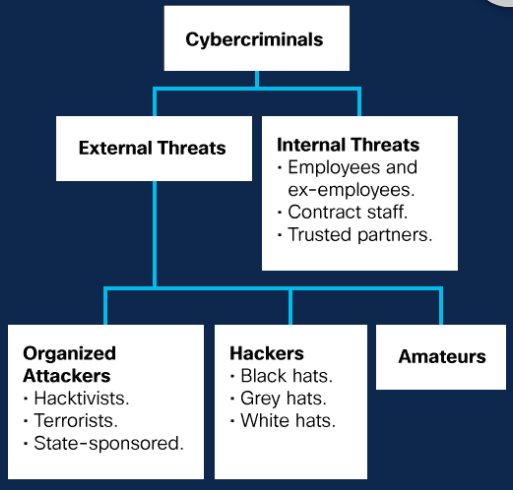
Comment: They mention typo squatting on domain names, it has a name now. LOL
Social Engineering Attacks
Social engineering attacks are very effective because people want to trust other people and social engineering attacks are not the kind of attack that the average user guards against; users are concerned with botnets, identity theft or ransomware. These are big external threats, so they do not think to question what seems to be a legitimate-looking message.
Baiting
Baiting relies on the curiosity or greed of the victim. What distinguishes baiting from other types of social engineering is the promise of an item or good that hackers use to entice victims. Baiters may offer users free music or movie downloads if the users surrender their login credentials to a certain site. Baiting attacks are not restricted to online schemes. Attackers can exploit human curiosity with physical media like USB drives.
Shoulder Surfing
Shoulder surfing is literally looking over someone’s shoulder to get information. Shoulder surfing is an effective way to get information in crowded places because it is relatively easy to stand next to someone and watch as they fill out a form or enter a PIN number at an ATM machine. Shoulder surfing can also be done long distance with the aid of modern cell phones, binoculars, or other vision-enhancing devices. To prevent shoulder surfing, experts recommend that you shield paperwork or your keypad from view by using your body or cupping your hand. There are even screen shields that make shoulder surfing much more difficult.
Pretexting
Pretexting is using deception to create a scenario to convince victims to divulge information they should not divulge. Pretexting is often used against organizations that retain client data, such as financial data, credit card numbers, utilities account numbers, and other sensitive information. Pretexters often request information from individuals in an organization by impersonating a supervisor, helpdesk clerk, or client, usually by phone, email, or text.
Phishing, spear phishing, and whaling attacks
In phishing attacks, the attackers try to obtain personal information or data, like username, password, and credit card details, by disguising themselves as trustworthy entities. Phishing is mainly conducted through emails and phone calls. Spear phishing is more targeted version of the phishing in which an attacker chooses specific individuals or enterprises and then customizes their phishing attack to their victims to make it less conspicuous. Whaling is when the specific target is a high-profile employee such as a CEO or CFO.
Scareware and ransomware
Ransomware attacks involve injecting malware that encrypts a victim’s critical data. The cyber criminals request a ransom to be paid to decrypt the data. However, even if a ransom is paid, there is no guarantee the cyber criminals will decrypt the information. Ransomware is one of the fastest growing types of cyberattack and has affected thousands of financial organizations, government agencies, healthcare facilities, even schools and our education systems.
Scareware takes advantage of a user’s fear by coaxing them into installing fake antivirus software.
Tailgating
Tailgating tricks the victim into helping the attacker gain unauthorized access into the organization’s physical facilities. The attacker seeks entry into a restricted area where access is controlled by software-based electronic devices or human guards. Tailgating can also involve the attacker following an employee closely to pass through a locked door before the door locks behind the employee.
Dumpster diving
In the world of social engineering, dumpster diving is a technique used to retrieve discarded information thrown in the trash to carry out an attack on a person or organization. Dumpster diving is not limited to searching through the trash for obvious treasures like access codes or passwords written down on sticky notes, it can also involve electronic information left on desktops, or stored on USB drives.

Bluejacking uses wireless Bluetooth technology to send unauthorized messages or shocking images to another Bluetooth device.
Bluesnarfing occurs when an attacker copies information, such as emails and contact lists, from a target’s device using a Bluetooth connection.
Pharming: This type of attack deliberately misdirects users to a fake version of an official website. Tricked into believing that they are connected to a legitimate site, users enter their credentials into the fraudulent website.
Whaling is a phishing attack that targets high profile individuals, such as senior executives within an organization, politicians and celebrities.
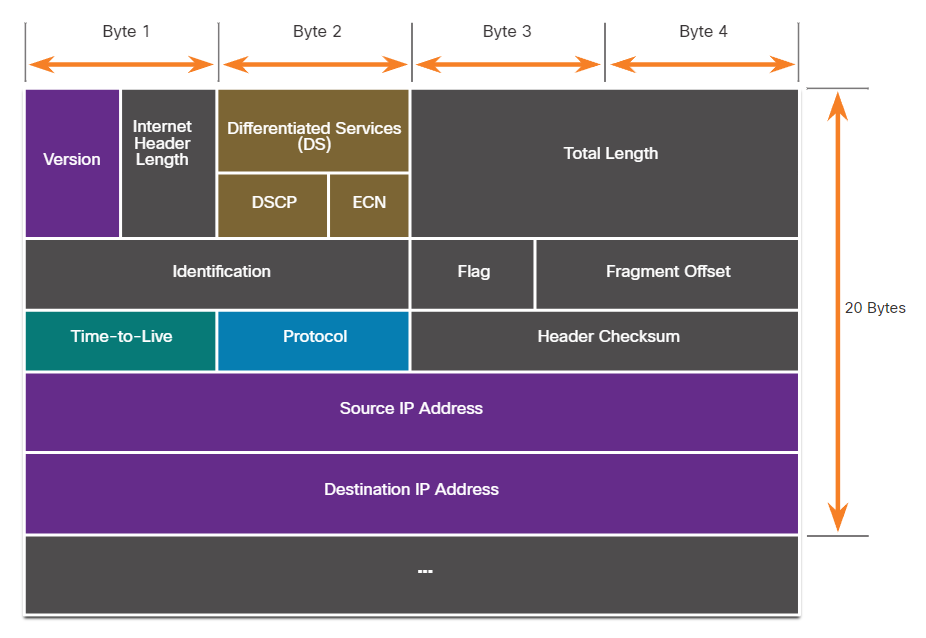
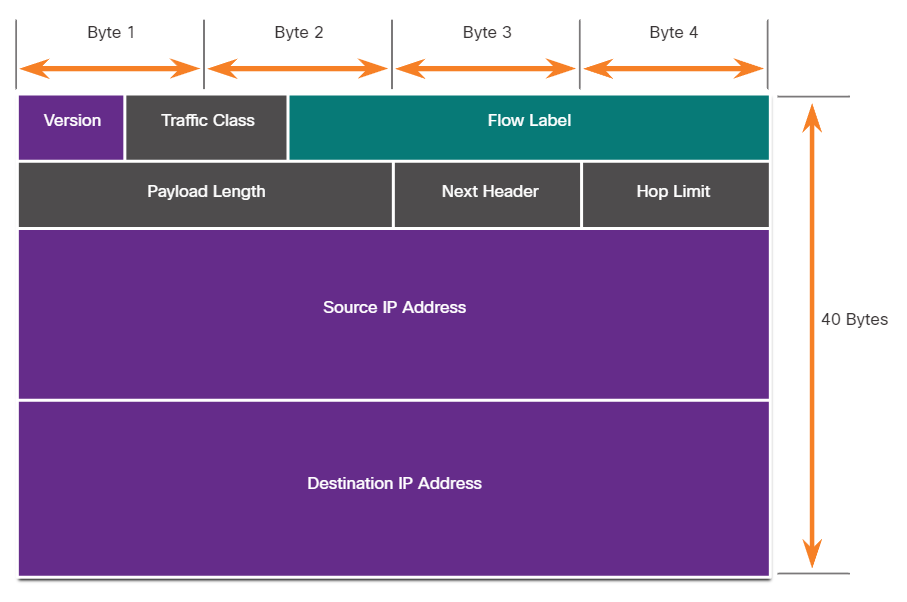
> This module provides an overview of the Layer 3 IP packet fields and the Layer 4 TCP and UDP segment fields, and discusses vulnerabilities of each.
IPv4 Header
IPv6 Header


Networks should have strict ICMP access control list (ACL) filtering on the network edge to avoid ICMP probing from the internet. Security analysts should be able to detect ICMP-related attacks by looking at captured traffic and log files. In the case of large networks, security devices, such as firewalls and intrusion detection systems (IDS), should detect such attacks and generate alerts to the security analysts.
Threat actors often use amplification and reflection techniques to create DoS attacks. The example in the figure illustrates how an amplification and reflection technique called a Smurf attack is used to overwhelm a target host.

Flood a bunch of targets with a ping and a spoofed source IP (the victims IP) then all responses will go to the victim.
- Amplification – The treat actor forwords ICMP echo request message to many hosts. These message contain the sourse IP address of the victim.
- Reflection – These hosts all reply to the spoofed IP address of the victim to overwhelm it.
Spoofing attacks can be non-blind or blind:
- Non-blind spoofing – The threat actor can see the traffic that is being sent between the host and the target. The threat actor uses non-blind spoofing to inspect the reply packet from the target victim. Non-blind spoofing determines the state of a firewall and sequence-number prediction. It can also hijack an authorized session.
- Blind spoofing – The threat actor cannot see the traffic that is being sent between the host and the target. Blind spoofing is used in DoS attacks.
MAC address spoofing attacks are used when threat actors have access to the internal network. Threat actors alter the MAC address of their host to match another known MAC address of a target host, as shown in the figure. The attacking host then sends a frame throughout the network with the newly-configured MAC address. When the switch receives the frame, it examines the source MAC address.

TCP Header
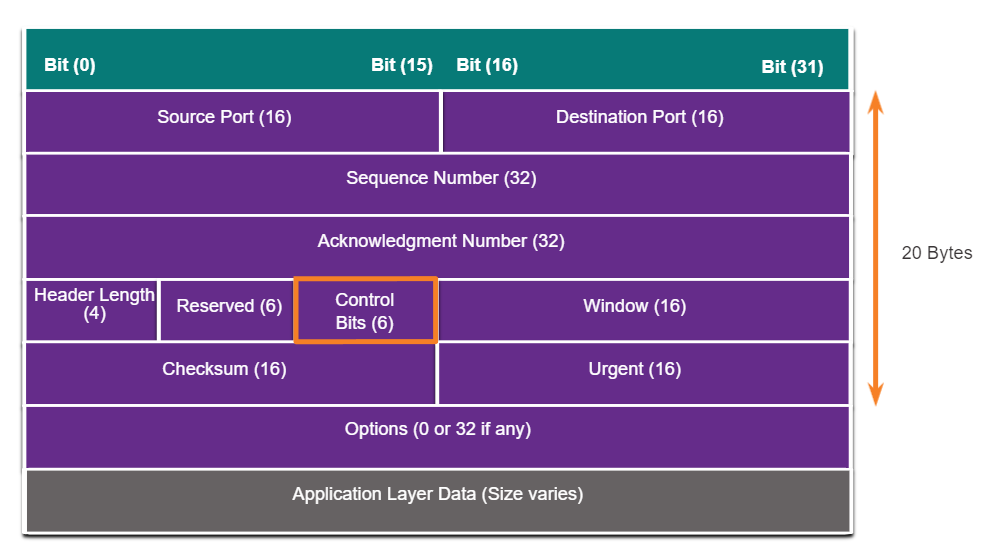
- URG – Urgent pointer field significant
- ACK – Acknowledgement field significant
- PSH – Push function
- RST – Reset the connection
- SYN – Synchronzse the sequence numbers
- FIN – No more data from sender
The TCP SYN Flood attack exploits the TCP three-way handshake. The figure shows a threat actor continually sending TCP SYN session request packets with a randomly spoofed source IP address to a target. The target device replies with a TCP SYN-ACK packet to the spoofed IP address and waits for a TCP ACK packet. Those responses never arrive. Eventually the target host is overwhelmed with half-open TCP connections, and TCP services are denied to legitimate users.
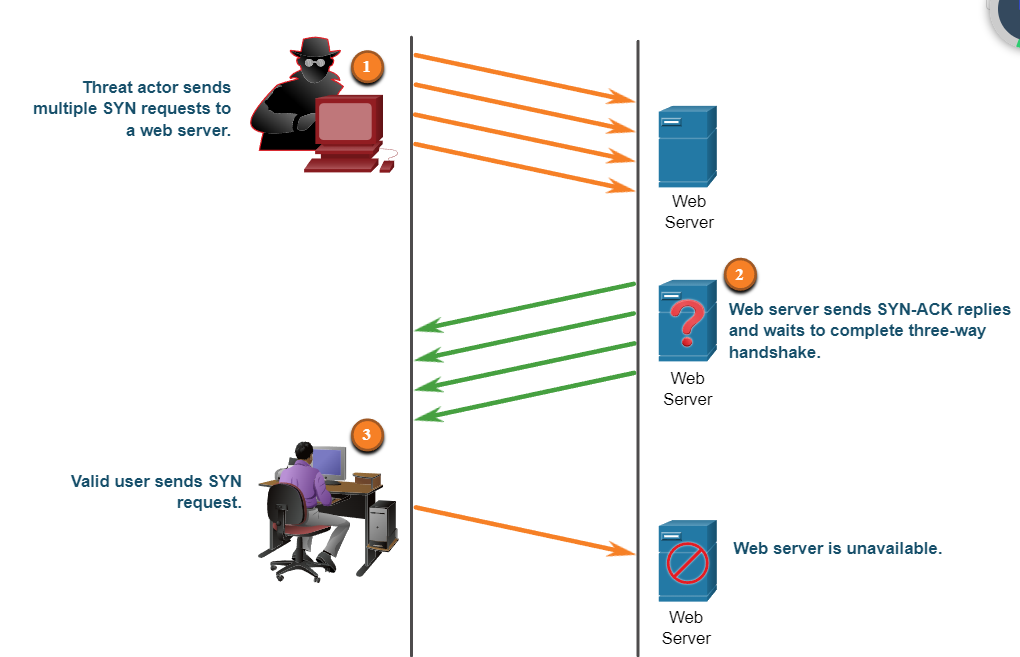
- The treat actor sends multiple SYN requests to the web server.
- The web server replies with SYN-ACK’s for each SYN request and wait for to complete the three way handshake. The treat actor does not respond to the SYN-ACK’s.
- The valid user cannot access the web server because the web server has too many half-opened TCP connections.
TCP Reset Attack
A TCP reset attack can be used to terminate TCP communications between two hosts. The figure displays how TCP uses a four-way exchange to close the TCP connection using a pair of FIN and ACK segments from each TCP endpoint. A TCP connection terminates when it receives an RST bit. This is an abrupt way to tear down the TCP connection and inform the receiving host to immediately stop using the TCP connection. A threat actor could do a TCP reset attack and send a spoofed packet containing a TCP RST to one or both endpoints.
Terminating a TCP session uses the following four-way exchange process:
- When the client has no more data to sent in the stream, it send a segment with the FIN flag set.
- The server sends an ACK to acknowledge the receipt of the FIN to terminate the session from client to server.
- The server sends the FIN to the client to terminate the server-to-client session.
- The client responds with an ACK to acknowledge the FIN from server.
TCP Session Hijacking
TCP session hijacking is another TCP vulnerability. Although difficult to conduct, a threat actor takes over an already-authenticated host as it communicates with the target. The threat actor must spoof the IP address of one host, predict the next sequence number, and send an ACK to the other host. If successful, the threat actor could send, but not receive, data from the target device.
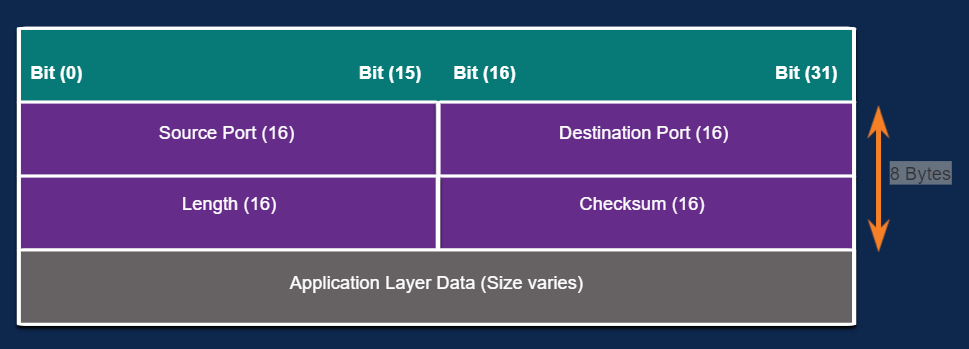
UDP Header
UDP Flood Attacks
You are more likely to see a UDP flood attack. In a UDP flood attack, all the resources on a network are consumed. The threat actor must use a tool like UDP Unicorn or Low Orbit Ion Cannon. These tools send a flood of UDP packets, often from a spoofed host, to a server on the subnet. The program will sweep through all the known ports trying to find closed ports. This will cause the server to reply with an ICMP port unreachable message. Because there are many closed ports on the server, this creates a lot of traffic on the segment, which uses up most of the bandwidth. The result is very similar to a DoS attack.
https://sourceforge.net/projects/udpunicorn/
ARP
Note: There are many tools available on the internet to create ARP MiTM attacks including dsniff, Cain & Abel, ettercap, Yersinia, and others.
Any client can send an unsolicited ARP Reply called a “gratuitous ARP.” This is often done when a device first boots up to inform all other devices on the local network of the new device’s MAC address. When a host sends a gratuitous ARP, other hosts on the subnet store the MAC address and IP address contained in the gratuitous ARP in their ARP tables.
However, this feature of ARP also means that any host can claim to be the owner of any IP/MAC they choose. A threat actor can poison the ARP cache of devices on the local network, creating an MiTM attack to redirect traffic. The goal is to associate the threat actor’s MAC address with the IP address of the default gateway in the ARP caches of hosts on the LAN segment. This positions the threat actor in between the victim and all other systems outside of the local subnet.
DNS
The Domain Name Service (DNS) protocol defines an automated service that matches resource names, such as www.cisco.com, with the required numeric network address, such as the IPv4 or IPv6 address. It includes the format for queries, responses, and data and uses resource records (RR) to identify the type of DNS response.
Securing DNS is often overlooked. However, it is crucial to the operation of a network and should be secured accordingly.
DNS attacks include the following:
- DNS open resolver attacks
- DNS stealth attacks
- DNS domain shadowing attacks
- DNS tunneling attacks
Fast Flux: Threat actors use this technique to hide their phishing and malware delivery sites behind a quickly-changing network of compromised DNS hosts. The DNS IP addresses are continuously changed within minutes. Botnets often employ Fast Flux techniques to effectively hide malicious servers from being detected.
Double IP Flux: Threat actors use this technique to rapidly change the hostname to IP address mappings and to also change the authoritative name server. This increases the difficulty of identifying the source of the attack.
Domain Generation Algorithms: Threat actors use this technique in malware to randomly generate domain names that can then be used as rendezvous points to their command and control (C&C) servers.
Threat actors who use DNS tunneling place non-DNS traffic within DNS traffic. This method often circumvents security solutions. For the threat actor to use DNS tunneling, the different types of DNS records such as TXT, MX, SRV, NULL, A, or CNAME are altered. For example, a TXT record can store the commands that are sent to the infected host bots as DNS replies. A DNS tunneling attack using TXT works like this:
- The data is split into multiple encoded chunks.
- Each chunk is placed into a lower level domain name label of the DNS query.
- Because there is no response from the local or networked DNS for the query, the request is sent to the ISP’s recursive DNS servers.
- The recursive DNS service will forward the query to the attacker’s authoritative name server.
- The process is repeated until all of the queries containing the chunks are sent.
- When the attacker’s authoritative name server receives the DNS queries from the infected devices, it sends responses for each DNS query, which contains the encapsulated, encoded commands.
- The malware on the compromised host recombines the chunks and executes the commands hidden within.
To be able to stop DNS tunneling, a filter that inspects DNS traffic must be used.
DHCP Spoofing Attack

A DHCP spoofing attack occurs when a rogue DHCP server is connected to the network and provides false IP configuration parameters to legitimate clients. A rogue server can provide a variety of misleading information:
- Wrong default gateway – Threat actor provides an invalid gateway, or the IP address of its host to create a MiTM attack. This may go entirely undetected as the intruder intercepts the data flow through the network.
- Wrong DNS server – Threat actor provides an incorrect DNS server address pointing the user to a malicious website.
- Wrong IP address –Threat actor provides an invalid IP address, invalid default gateway IP address, or both. The threat actor then creates a DoS attack on the DHCP client.
Assume a threat actor has successfully connected a rogue DHCP server to a switch port on the same subnet as the target clients. The goal of the rogue server is to provide clients with false IP configuration information.
Enterprise
The OWASP Top 10 Web Application Security Risks is designed to help organizations create secure web applications. It is a useful list of potential vulnerabilities that are commonly exploited by threat actors.
Domain Shadowing
When a threat actor wishes to create a domain shadowing attack, the threat actor must first compromise a domain. Then, the threat actor must create multiple subdomains of that domain to be used for the attacks. Hijacked domain registration logins are then used to create the many subdomains needed. After these subdomains have been created, attackers can use them as they wish, even if they are found out to be malicious domains. They can simply make more from the parent domain. The following sequence is typically used by threat actors:
- A website becomes compromised.
- HTTP 302 cushioning is used to send the browser to malicious websites.
- Domain shadowing is used to direct the browser to a compromised server.
- An exploit kit landing page is accessed.
- Malware downloads from the exploit kit landing page.
Break: Need to download two *.ova files at 2.1GB each and the connection is slow. Just going to leave the course now and let these download. https://skillsforall.com/resources/lab-downloads
Reconnaissance attacks can be mitigated in several ways, including the following:
- Implementing authentication to ensure proper access.
- Using encryption to render packet sniffer attacks useless.
- Using anti-sniffer tools to detect packet sniffer attacks.
- Implementing a switched infrastructure.
- Using a firewall and IPS.
A surprising number of access attacks are carried out through simple password guessing or brute-force dictionary attacks against passwords. To defend against this, create and enforce a strong authentication policy which includes:
- Use strong passwords –Strong passwords are at least eight characters and contain uppercase letters, lowercase letters, numbers, and special characters.
- Disable accounts after a specified number of unsuccessful logins has occurred –This practice helps to prevent continuous password attempts.

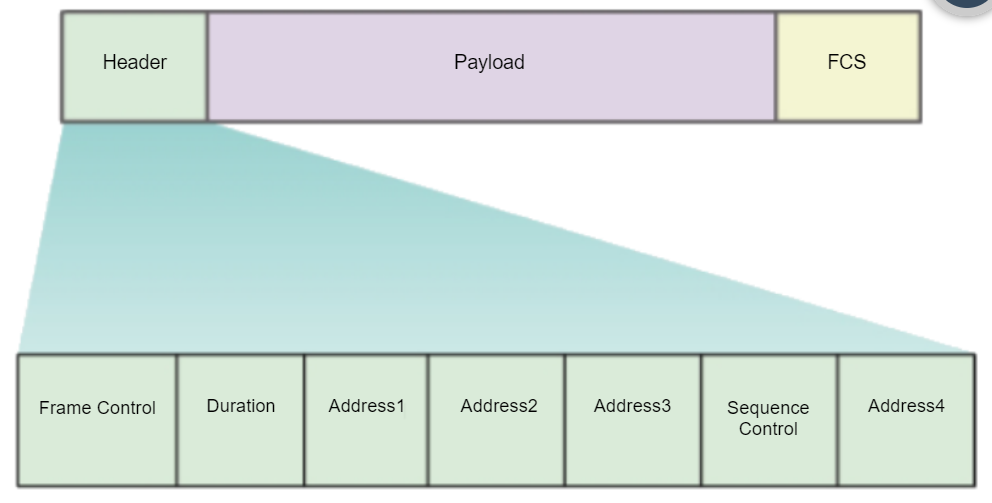
All 802.11 wireless frames contain the following fields:
- Frame Control – This identifies the type of wireless frame and contains subfields for protocol version, frame type, address type, power management, and security settings.
- Duration – This is typically used to indicate the remaining duration needed to receive the next frame transmission.
- Address1 – This usually contains the MAC address of the receiving wireless device or AP.
- Address2 – This usually contains the MAC address of the transmitting wireless device or AP.
- Address3 – This sometimes contains the MAC address of the destination, such as the router interface (default gateway) to which the AP is attached.
- Sequence Control – This contains information to control sequencing and fragmented frames.
- Address4 – This usually missing because it is used only in ad hoc mode.
- Payload – This contains the data for transmission.
- FCS – This is used for Layer 2 error control.
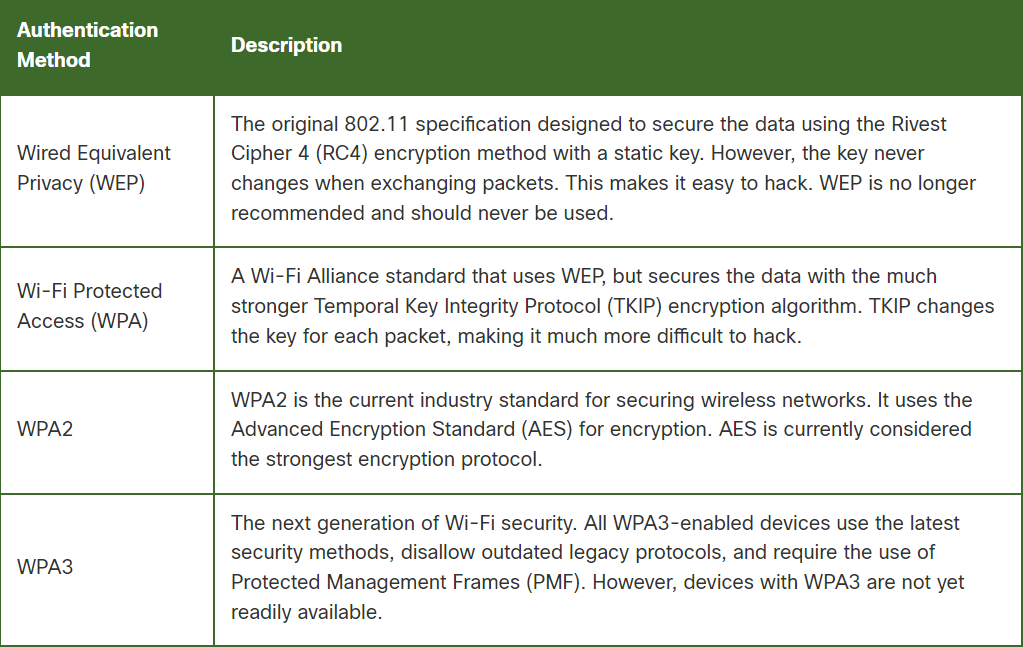
WiFi Encryption
Course Complete: https://www.credly.com/badges/f98dcd9f-7efc-4fc2-a320-a8bd5a35df57